Overview
The local app that shows what your factory does, what it costs, and where humans intervened.
The studio is openfabriq's local app: follow the work of your factories, review a run, and see where people had to step in.
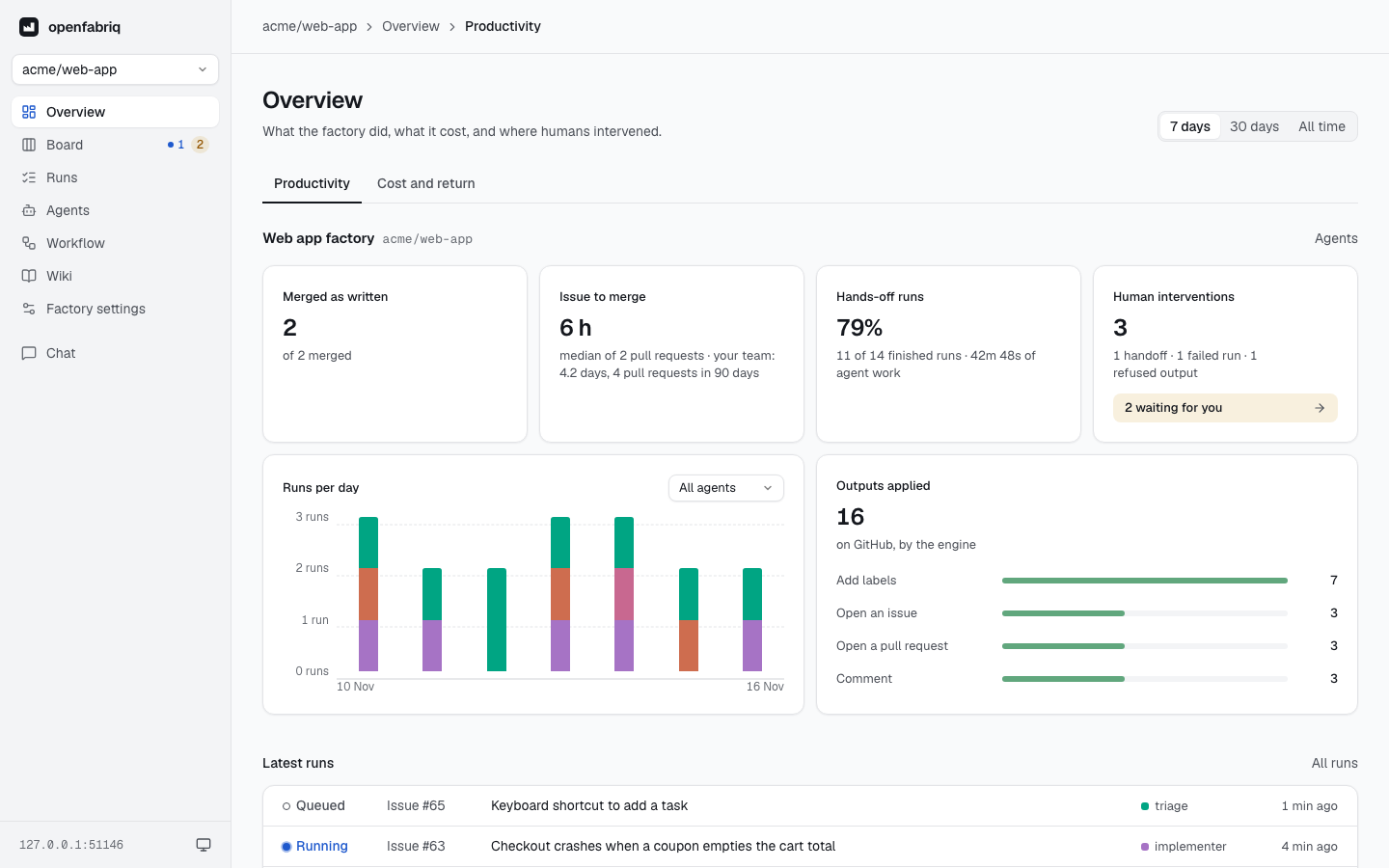
The overview of a project over 7 days.
openfabriq start serves the studio on http://127.0.0.1:4310, for every project on the machine.
- It is locked by a token. Open it with the address that
startprints,http://127.0.0.1:4310/?token=…. The token becomes a cookie in your browser, and the studio answers nothing without it: code in an agent's sandbox reaches127.0.0.1too, and reads nothing. Eachstartdraws a new token. The cookie is named after the studio's port, so two engines on one machine each keep their own. On a server, a password or sign-in with GitHub can replace the token (see the table below). - It only reads. Work starts on GitHub, Slack, Linear or Sentry, or with
openfabriq run. - Two exceptions. The chat writes your conversations, on the machine. The Wiki page's Generate the wiki or Update the wiki button asks the engine for a run, like
openfabriq run wiki.
Open it
| Where the engine runs | How to open the studio |
|---|---|
| Your machine | Run openfabriq start, then open the address it prints |
A server, with OPENFABRIQ_STUDIO_PASSWORD and OPENFABRIQ_STUDIO_URL | Open the studio's address and type the password: see Docker |
A server, with GITHUB_APP_CLIENT_ID, GITHUB_APP_CLIENT_SECRET and OPENFABRIQ_STUDIO_URL | Open the studio's address and sign in with GitHub: see Docker |
| A server, without them | Run ssh -L 4310:127.0.0.1:4310 <server>, then open the address that start printed on the server, on your laptop |
| Nowhere, to read past runs only | Run pnpm --filter @openfabriq/studio serve from the sources. It prints the address to open, reads ~/.openfabriq, polls nothing and starts no agent |
With GitHub sign-in, each person who can write to the factory's repositories enters with their own account. With a password or GitHub, the bottom of the sidebar shows your GitHub login, or the studio's address, and a Sign out button, which clears the studio's cookie in that browser.
The studio shows one project at a time: the selector at the top of the sidebar switches between them, and the studio opens on the last one you chose. The theme follows your system; the button at the bottom of the sidebar overrides it. The layout adapts to a phone.
Pages
| Page | Shows |
|---|---|
| Overview | What the factory did, what it cost, and where humans intervened |
| Board | What is waiting, working, needs you or is done, right now |
| Runs | Every run, and what happened in each one, step by step |
| Agents | Who works, when, with which rights and tools |
| Workflow | How work moves from one automation to the next |
| Wiki | The map of the code the engine keeps, to read and search, and a button to update it |
| Factory settings | What factory.yaml sets, and what is missing on this machine |
| Chat | Answers to your questions about the factory |
The overview page
The overview covers the last 7 days, the last 30 days, or all time. It has two views.
Productivity has four figures, then the runs per day by agent (a menu keeps one agent), the applied outputs by kind and the latest runs:
- Merged as written: the factory's pull requests merged with no commit of a person on them. The engine notes the commits it pushes, so any other commit, an Update branch on GitHub included, counts as a person's. Pull requests it cannot check are counted apart: those opened before the engine noted its commits, and those older than the repository's 100 latest merged pull requests.
- Issue to merge: the median time from the opening of the issue a pull request closes (its
Closes #12) to its merge, for the factory's pull requests, next to the same median for your team's pull requests merged in the last 90 days. Only the repository's 100 latest merged pull requests are read; pull requests that close no issue are left out. - Hands-off runs: the share of finished runs that succeeded with no hand-off and no refused output, and the time the agents spent working.
- Human interventions: hand-offs to
needs-human, failed runs, refused outputs, and a link to what is waiting for you.
Cost and return has four figures too, then the cost per day and per agent, chat included:
- Spent: agents and chat, with the cost per run.
- Cost per PR merged as written: what was spent over the period, divided by the pull requests merged as written, next to the cost per merged pull request.
- Time gained per issue: how much shorter the factory's median time from issue to merge is than your team's over 90 days; "lost" when it is longer.
- Lost to failed runs: what the failed runs cost.
Every figure is counted from the runs and GitHub; none is estimated.
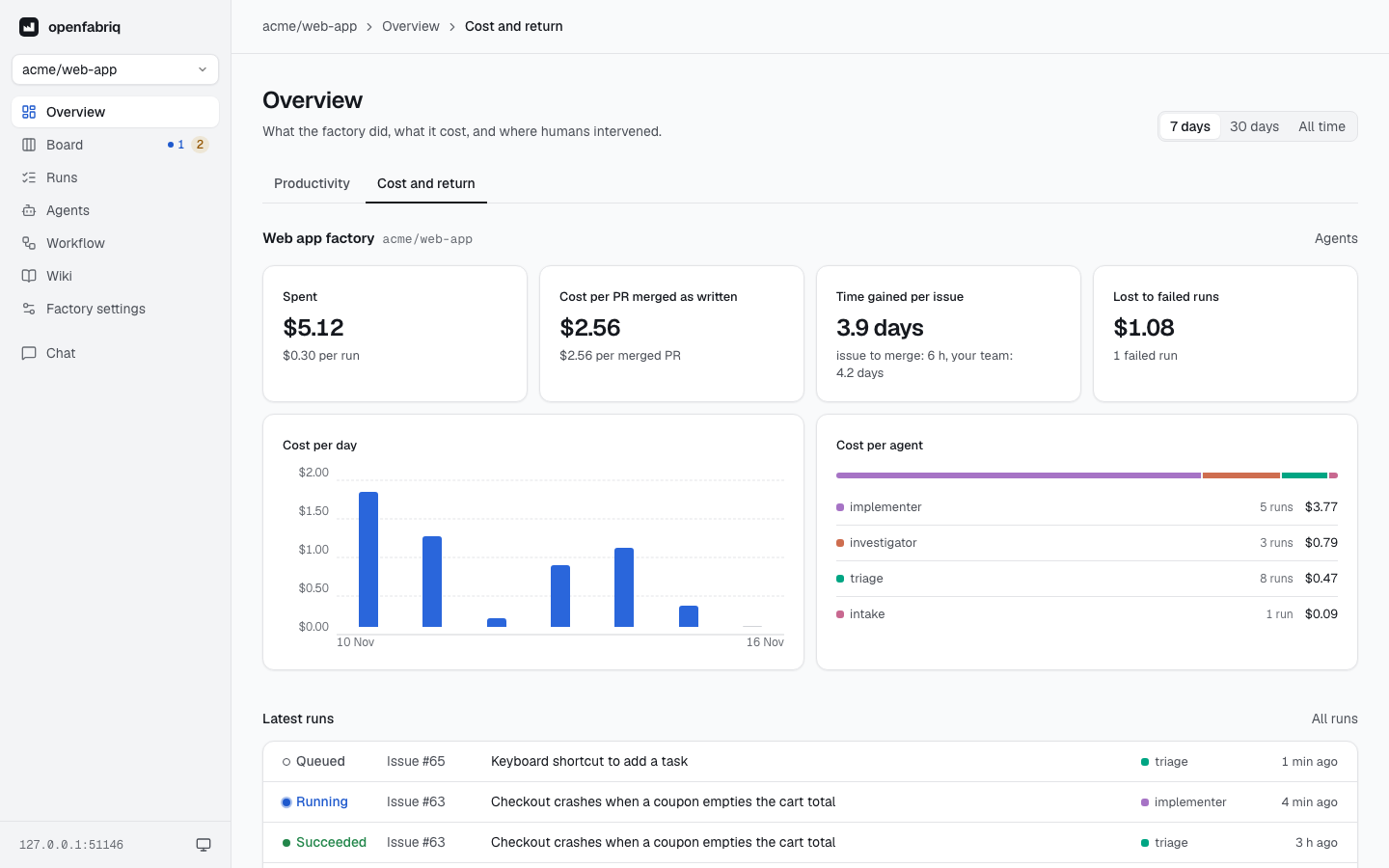
On a subscription, nothing is billed per token. The studio reports what the same tokens would cost on the API, which measures how much of your quota the factory uses.