Local
Install openfabriq on your computer and run the engine in a terminal. The quickest way to start.
openfabriq installed on your computer, started in a terminal, with your Claude Code and gh logins. For a team, on an always-on server, use Docker.
Before you start
On your computer:
- Install openfabriq, with Claude Code and
ghlogged in. - In a clone of each repository, run
openfabriq apply(Quickstart).
Start the engine
openfabriq startOne process watches every applied repository of the machine. It stays in the foreground; Ctrl-C stops it. Run only one: a second start stops before doing anything, since the studio's port is taken, or, with another --port, another engine already runs the same data folder.
In a repository whose openfabriq/ changed since the last apply, it first shows the plan and asks to apply it: answer y. Enter alone, or any other answer, starts the engine with the factory applied before.
In a terminal, it starts with the studio's address, then the log:
  Studio    http://127.0.0.1:4310/?token=…
            open it to follow the runs · Ctrl-C stops the engine
  Watching  acme/api-service, acme/web-app, every 60 s
  Claude    this machine's Claude Code login

  ── activity ──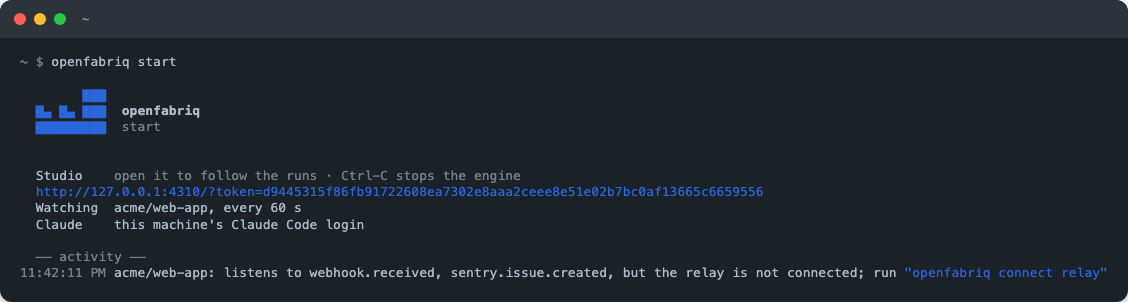
Open that address, with its token, to follow the runs in the studio. In a pipe or in Docker's logs, the same facts are log lines, the address on the one that starts with studio on.
What it does every minute
- Watch. Read each project's new GitHub events with
gh, take what the relay kept for Slack, Linear, Sentry and webhooks, and compare them with thewhenof the applied factory. - Queue. Each matching event becomes a run in the queue, written to disk: a restart loses nothing. A run interrupted by a stop is marked failed and queued once more.
- Prepare. Create a worktree of the engine's own clone (from the default branch, or the pull request's branch), run
setup, load the skills. - Run the agent with your Claude Code: its brief, the automation's task, the subject marked as data, its tools, one tool per
canword. - Apply. Run the checks if the agent changed files, check each proposal against
can, apply it withgh, note what was refused. - Record the run: status, duration, tokens, cost, outputs.
The number of simultaneous runs is limited for the whole machine, since they share one subscription.
Everyday commands
openfabriq start --interval 30     # poll every 30 seconds (10 or more)
openfabriq start --port 4320       # the studio on another port
openfabriq status                  # runs in progress, waiting and recent, from another terminal
openfabriq run <automation> [--issue n | --pr n] [--project owner/repo]
openfabriq mcp                     # the factories, read only, for Claude Code or Claude Desktop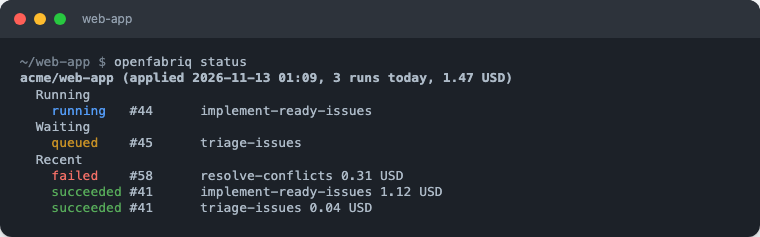
openfabriq run asks the running engine to start an automation now: try an automation, or run a scheduled one outside its schedule.
After openfabriq apply, a new or changed factory is picked up at the next pass, with no restart. After an openfabriq connect, or when the factory's Slack, Linear, Sentry or webhooks changed, restart start: it connects them when it starts.
Schedules and sleep
Nothing runs while the machine sleeps. A missed schedule is caught up once: at the next pass, the engine starts one run for the most recent time missed, and the studio shows it as caught up. During a run, the engine keeps a Mac awake (caffeinate -i).
For a nightly task that must start on time on a Mac, wake the machine just before:
sudo pmset repeat wakeorpoweron MTWRFSU 01:55:00Your quota
Runs use the machine's Claude Code subscription: on your computer, they share its quota with your own sessions. Keep limits honest, and watch the cost in the studio's overview.
If ANTHROPIC_API_KEY is set in the shell that starts the engine, runs use that key instead, billed per token, and openfabriq start says so on its first lines. Unset it before openfabriq start to stay on your subscription.
Update openfabriq
openfabriq updateIt updates openfabriq the way it was installed: brew upgrade openfabriq for Homebrew, otherwise npm install -g openfabriq@latest. From the sources or in Docker, it says how to update instead. start prints a line when a new version is out.
- From the sources:
git pull && pnpm install && pnpm buildin its folder; the command keeps working. - The Claude Code plugin, if you installed it:
claude plugin marketplace update openfabriq && claude plugin update openfabriq@openfabriq. - On a server: see Docker.
Then restart start. If the format changed, the studio and plan say the applied factory no longer loads: run openfabriq validate, fix what it lists, and apply again.
Where files are kept
Your factory is the openfabriq/ folder of your repository, versioned with your code. The engine keeps everything else on its own machine, in ~/.openfabriq: the applied factories, its clones, the queue, the runs and their transcripts, the chat's conversations, the tokens saved by openfabriq connect (secrets.json, mode 0600) and the values saved by openfabriq secret set. The paths, and OPENFABRIQ_HOME to move the folder, are in The data folder.
Worktrees of finished runs are removed.
Forget a project
Delete its folder ~/.openfabriq/projects/<owner>/<repo>/ while start is stopped. The openfabriq/ folder of your repository stays yours.
Uninstall
- Stop
openfabriq start(Ctrl-C). - Remove the command:
brew uninstall openfabriq, ornpm uninstall -g openfabriq. If you installed the plugin:claude plugin uninstall openfabriq@openfabriq. - Remove its data, runs and saved tokens included:
rm -rf ~/.openfabriq(or yourOPENFABRIQ_HOME).