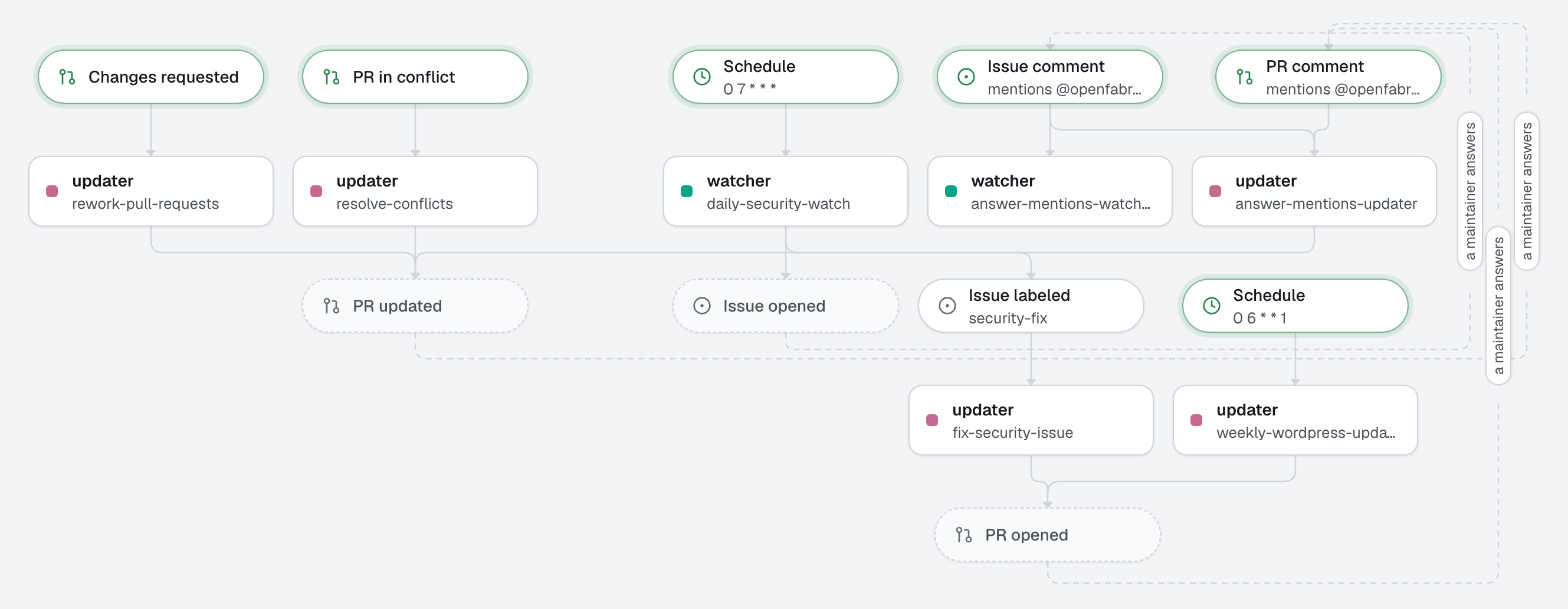
A factory that keeps a WordPress site up to date and safe, for a site whose core, plugins and themes are Composer packages (a Bedrock-style repository, with wpackagist). Every Monday, one pull request brings everything up to date and explains each bump. Every morning, a watcher checks the installed plugins and themes against WPScan's vulnerability database; each new vulnerability becomes an issue, and that issue gets its fix as a pull request within minutes. A human merges; the site's own deploy ships it.
This one keeps a WordPress site alive; 26-webflow-to-astro and 27-framer-to-astro move a site to Astro.
What this factory does
- Every Monday at 06:00, the updater opens one pull request that brings the core, the plugins and the themes up to date, and explains each bump. Known vulnerabilities are fixed on the way; major versions are left for a human.
- Every morning at 07:00, the watcher checks the installed plugins and themes against WPScan. Each new vulnerability that hits an installed version becomes one issue, labeled
security-fix. When nothing is new, it writes nothing. - The
security-fixlabel starts the updater on that issue. When a version fixes the vulnerability, it opens a pull requestfix(security): …that closes the issue. When none does yet, it comments what is affected, the workaround, and what a person has to decide.
Inside a run: vulns runs scripts/wpscan-report.sh, which asks WPScan about every plugin and theme of composer.lock, outdated lists what is behind, the agent reads the changelogs, edits composer.json and runs update. Before a pull request leaves the machine, the engine runs the checks itself (syntax, lint, analyse) and refuses it if one fails.
Notes
- Only a site in git, managed with Composer. openfabriq works on the repository, never on the live site. A site updated by hand in wp-admin, or with plugins committed as files, does not fit: move it to Composer first.
secrets: [WPSCAN_API_TOKEN]: the commands receive it, and thevulnsscript reads it; never an agent. Get a token on wpscan.com, thenopenfabriq secret set WPSCAN_API_TOKEN. The free plan has a small daily quota of requests, one per plugin or theme: check yours against the size of the site.- The watcher reports only what is new (published in the last 26 hours). It cannot see GitHub, so it does not know what it reported before; the weekly update fixes the older vulnerabilities.
create_issue: [security-fix]: the engine puts the label on every issue the watcher opens, which starts the fix. Nothing else starts it, so a person can also label an issuesecurity-fixby hand.concurrency: repositoryon every automation: one run at a time, so a fix and the weekly update never race oncomposer.lock.- No database in the checks. The commands' sandbox lets out only HTTP and HTTPS, so a check cannot reach MySQL: WordPress integration tests and WP-CLI against a database do not run here. The checks are static: PHP syntax, the WordPress Coding Standards (
phpcs), and PHPStan. Test what changed on a staging site before you merge ahighrisk bump. - The script comes from the applied factory.
vulns: scripts/wpscan-report.shrunsopenfabriq/scripts/wpscan-report.shasapplycopied it, never the file of a pull request's branch: changing it goes throughplan, which shows it as a security change. Its test runs it on a fakecomposer.lockagainst a fake WPScan, with no token and no quota:node --test 'openfabriq/scripts/test/*-test.mjs'(it needsphp). - The agents never deploy.
canhas no merge: the pull request waits for a human, and your CI deploys what is merged.
Tree
openfabriq/
├── factory.yaml                       timezone, setup (composer install), commands (outdated, update, vulns, syntax, lint, analyse), checks, secrets
├── scripts/
│   ├── wpscan-report.sh               the vulns command: composer.lock → WPScan → wpscan-report.json
│   └── test/                          its test, with a fake composer.lock and a fake WPScan
├── agents/
│   ├── updater/agent.md               bumps through Composer, a table per package, security first, majors for a human
│   └── watcher/agent.md               new vulnerabilities only, one issue per package, no exploit copied
└── automations/
    ├── weekly-wordpress-updates/      when: schedule "0 6 * * 1"; can: create_pull_request
    ├── daily-security-watch/          when: schedule "0 7 * * *"; can: create_issue [security-fix]
    ├── fix-security-issue/            when: issue.labeled security-fix; can: create_pull_request, add_comment
    ├── rework-pull-requests/          when: pull_request.changes_requested
    └── resolve-conflicts/             when: pull_request.conflicted (composer.lock regenerated, never edited)
Make it yours
- Copy the
openfabriq/folder to the root of your repository. - In
factory.yaml, replacerepository,maintainersandtimezone. Adapt the paths ofsyntaxto where your own code lives (web/app/themesandweb/app/mu-pluginsin Bedrock), andlintandanalyseto your tools: they expect aphpcs.xmlwith the WordPress standard and aphpstan.neon(withszepeviktor/phpstan-wordpress, for example). - Run
openfabriq doctor: it checks that the engine's machine hascomposer. Thevulnsscript and thesyntaxcheck also runphp, whichdoctorcannot see behind them. - Run
openfabriq plan: it lists the commands, the script, the checks and the secret as security changes, since they run on your machine. openfabriq apply, thenopenfabriq secret set WPSCAN_API_TOKEN(it takes only a name of an applied factory), thenopenfabriq start.- To try it now:
openfabriq run daily-security-watch, oropenfabriq run weekly-wordpress-updates.