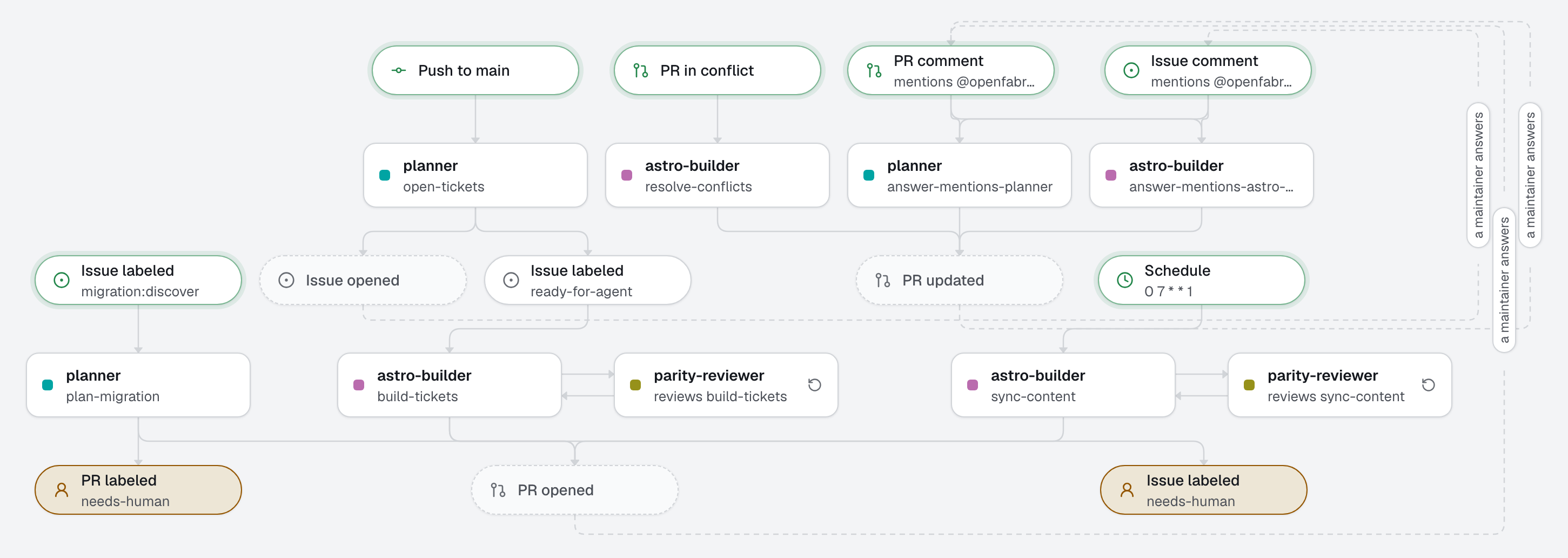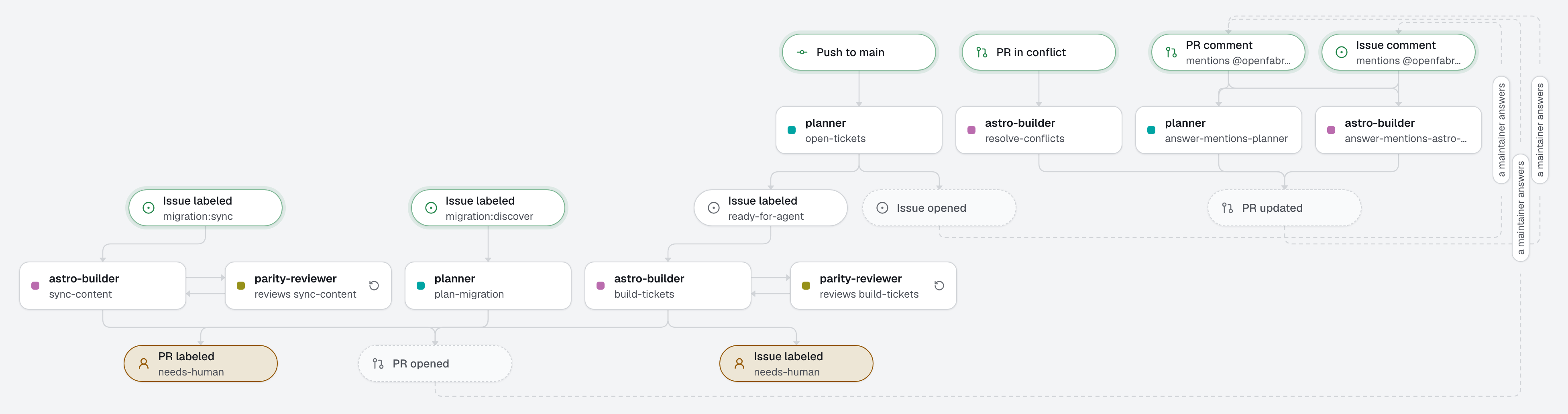
A factory that moves a Framer site to an Astro site, in the repository of the new site, close to one shot. The planner surveys the Framer site, its CMS from an export a maintainer commits and its published pages, settles each question with its own recommendation, and slices the work into tickets: all of it in one pull request, the plan. A maintainer reads and merges it: that is the one checkpoint. From there, each merge opens the tickets it unblocks, the builder builds each one with side by side screenshots, and before its pull request opens, the parity review compares the Framer and the Astro pages and sends any loss back to the builder. A person merges each pull request the review approved (ready-to-merge, with its risk), and acts where the factory writes needs-human. When editors change the CMS in Framer, a maintainer exports it again and the builder brings the changes back: nobody stops writing while the site moves.
It follows 26-webflow-to-astro, phase by phase, and adds what Framer changes: no code export, no API key the factory could hold safely, and a CMS export with gaps. The concept it teaches: a factory with no secret at all. A person exports the CMS with Framer's own plugin and commits it; a command with no token downloads the files it points to; the agents read everything else on the published pages.
What this factory does
Tickets have a type, in their title: foundation (the skeleton, pnpm run import and pnpm parity, always first), content-type (one CMS collection, its ids and galleries, its tested mapper), template (one page template), feature (a form, an effect, a code component, search, filters…), seo (redirects, sitemap, metadata), and switch (what a person does to go live, always last).
The flow
- Discover: a maintainer commits the CMS export to
migration/framer-cms/(none if the site has no CMS: say so in the issue), opens a migration issue and addsmigration:discover. The planner surveys the site and opens one pull request, the plan:migration/inventory.md(what the site has),migration/decisions.md(each question, the planner's choice and why), and one file per ticket inmigration/tickets/(its type, what blocks it, its acceptance criteria). What no agent can decide (an account to create, the final domain, the redirects) is listed in the pull request, which carriesneeds-humanuntil a person merges it: everything waiting for you is there, never on the issue. - The checkpoint: a maintainer reads the plan and merges it. A comment on it before that, starting with
@openfabriq, sends the planner back to change it in the same pull request; people can discuss it there without starting anything. - Tickets open as they unblock: each push to the default branch, the plan's merge or a ticket's, starts the planner. It opens, with
ready-for-agent, each ticket whose last blocker this push merged: T01 first, then up to four at a time, which is how many run at once on the engine. Nothing else: a push that unblocks nothing opens nothing. - Build: the builder builds the ticket, opens a pull request with side by side screenshots, and marks the ticket
Status: donein its file, which is what the planner reads once it merges. - Review, before the pull request: when the builder finishes and the checks pass, the engine runs the parity review on its change (
reviewed_by), on the machine. A loss goes back to the builder, until parity holds: nothing of that loop is written on GitHub. The pull request then opens with one line on the review,ready-to-mergeand its risk (risk:lowwhen the change only builds pages, content or scripts of a site not yet live). When the review asks for a person, or after 3 rounds (review_rounds), it opens withneeds-humanand only the findings still open. A person merges: that merge is step 3 again. A content sync is reviewed the same way. - Switch: the last ticket,
switch, opens when every other one is merged. The builder builds nothing for it: it comments the checklist (freezing the CMS and running a last sync, moving the domain, putting the redirects live, cancelling the Framer plan) and addsneeds-human.
Tree
openfabriq/
├── factory.yaml                       LEGACY_SITE_URL, commands, checks; no secret
├── scripts/
│   ├── framer-files.sh                the files command: every file of Framer's CDN the CMS export points to, into framer-export/
│   └── test/                          its test, against a fake CDN
├── agents/
│   ├── planner/agent.md               surveys the site, settles the questions, slices the tickets; opens them as they unblock
│   ├── astro-builder/agent.md         builds a ticket, fixes what the review flagged, syncs the content
│   └── parity-reviewer/agent.md       Framer against Astro before the pull request opens: visual, content, effects, SEO, links (opus)
├── automations/
│   ├── plan-migration/                when: issue.labeled migration:discover; opens the plan's pull request
│   ├── open-tickets/                  when: default_branch.updated; opens the tickets that push unblocked
│   ├── build-tickets/                 when: issue.labeled ready-for-agent; reviewed by parity-reviewer
│   ├── resolve-conflicts/             when: pull_request.conflicted
│   └── sync-content/                  when: issue.labeled migration:sync; reviewed by parity-reviewer
└── skills/
    ├── framer-reading/SKILL.md        the CSV export and its gaps, the published pages, effects, forms, redirects
    ├── astro-conventions/SKILL.md     collections, mappers, pnpm run import, breakpoints, no Framer runtime, no Framer CDN
    ├── keystatic/SKILL.md             the content as Keystatic files, only when the plan chooses it
    └── browser-evidence/SKILL.md      Framer and Astro pages side by side with agent-browser
What Framer lets you take
What Framer's own documentation and tools say, checked before writing this template:
- No code export. Framer publishes the site on its own servers and offers no download of its HTML, CSS or React: third-party scrapers exist, but none is Framer's. The published site is the reference, and the agents read it page by page.
- The CMS, as CSV. Framer's CMS Export plugin writes one CSV per collection. It holds the slug, a draft column, and one column per field: formatted text as HTML, an image as its URL and its alternative text, files and links as URLs. It leaves out gallery fields, and gives references and options as ids, with no id column to resolve them: the builder reads those on the published item pages, into
migration/framer-cms/ids.jsonand<collection>.galleries.json. The CSV holds the default locale only. - The files are on Framer's CDN (
framerusercontent.com), public, with no bulk download. Thefilescommand downloads those the export points to. - Pages, effects, code components, overrides, forms, redirects, locales: no export. The sitemap Framer publishes lists the pages; the agents read the rest on the pages, and a maintainer copies the redirects from the site settings into
migration/redirects.csv: the plan lists it as still open, and theseoticket waits for that file. - The Server API (
framer-api, in open beta) reads collections, pages, redirects, locales and code files. But its key is bound to a project and acts as the person who created it: the same API edits the CMS and publishes the site, and no key can be limited to reading. An agent that runs a command could read a key the command holds, so this factory never gets one.
The export, and its files
- In the Framer editor, open Plugins > CMS Export, and export each collection.
- Commit each file as
migration/framer-cms/<collection>.csv, named like the collection's URLs (blog.csvfor/blog/<slug>). - The export holds drafts. The import skips them, but they are in the repository: keep it private, or delete the draft rows before committing.
files runs scripts/framer-files.sh: it finds every URL of Framer's CDN in migration/framer-cms/, galleries included, and downloads each one into framer-export/, which the site's .gitignore leaves out. It needs no token. pnpm run import, written by the foundation ticket, turns the CSV files and the downloaded files into the site's content without calling the network.
- The script comes from the applied factory, never from a pull request's branch: changing it goes through
plan, which shows it as a security change. - A command has 10 minutes: a site with thousands of files may need several runs, or a larger limit.
- Its test runs it against a fake CDN on this machine:
node --test 'openfabriq/scripts/test/*-test.mjs'.
The old site is the published one
Agents read the published site at LEGACY_SITE_URL. Use its framer.website address while it answers on its own: it keeps the agents' visits out of the real domain's analytics. They never open the Framer editor, never submit a form, never write to Framer.
What the published page shows but Framer does not export, the agents describe and rebuild:
- Effects (appear, scroll, hover, page transitions) and code components and overrides (React that runs only inside Framer): rebuilt in CSS or a small island, never copied.
- Breakpoints: each page is read and compared at every width the Framer site has.
- Forms: Framer handles their submissions; the plan decides where they go after the switch.
- Other locales: read on the pages; each one is its own ticket, with its own export.
Optional: editing in Keystatic after the switch
By default, the content lands as Markdown files in the repository, which a developer edits through pull requests. For editors who want a UI after the switch, ask for Keystatic in the migration issue, or comment @openfabriq use Keystatic for editing on the plan's pull request: the planner writes it into the editing decision, and the tickets follow the keystatic skill. The content stays the same files, with an admin UI at /keystatic that commits them. What it costs: the host must run Node for that page, and at the switch a person creates Keystatic's GitHub App (or a Keystatic Cloud project) and copies its variables to the host.
What needs a person
The factory runs on its own between the plan and the switch. A person acts in three places only:
- The plan: read it and merge it. It is the one checkpoint, and the cheapest place to change course: comment on it to change a decision or a ticket.
needs-human, on whatever carries it. It always says why in a comment:- on the migration issue: something only a person can do, such as creating an account, committing a missing CMS export, copying the redirects, or choosing the final domain. When the answer changes the plan, comment on the plan before merging it; after that, write it in
migration/decisions.mdyourself, or commit the file: a ticket waiting on it (Blocked by: a person: …) opens with that push; - on a pull request: the review asked for a person, or its rounds ran out. Read its Internal review section, then merge it, or comment
@openfabriqand what to change; - on a ticket: the builder could not build it without inventing an answer, or it is the
switch, the last step, which is yours. For the first, answer in a comment and addready-for-agentagain: the builder reads the ticket's comments.
- on the migration issue: something only a person can do, such as creating an account, committing a missing CMS export, copying the redirects, or choosing the final domain. When the answer changes the plan, comment on the plan before merging it; after that, write it in
- The content: when editors have changed the CMS, export it again, commit the CSV files to the default branch, and add
migration:syncon the migration issue. The sync's pull request is reviewed like any other, before it opens, and a person merges it.
needs-human is also the label the engine adds when it gives up on a run. Filter your issues and pull requests on it: that is your whole to-do list. One case carries no label: when several merges land within the same minute and unblock more than five tickets, the planner opens five, and the others wait. If the build stops while a ticket of migration/tickets/ is not done and its blockers are, open an issue with its file's text and add ready-for-agent. Turn on GitHub's merge queue if several pull requests can merge at once.
The switch is never automated: the factory has no access to the DNS, the hosting or Framer. Keep the Framer site published a few days, then cancel the plan: the content and its files are already in the repository.
Least privilege: the planner may open the plan's pull request and the tickets; the builder may open pull requests; the reviewer writes nothing on GitHub: it gives a verdict to the engine. Nothing merges without a person. No agent and no command holds a Framer key.
Make it yours
- Start the new site's repository with an Astro project that has
buildandtestscripts and a lockfile (pnpm create astro@latest --template minimal, then Vitest), sosetupand the checks work from the first run. - Copy the
openfabriq/folder to its root. - In
factory.yaml, replacerepository,maintainersandLEGACY_SITE_URL(the site'sframer.websiteaddress, in the site settings under Domains). - Export the CMS and commit it, as above.
- Install the browsers once on the engine's machine:
npm install -g agent-browser && npx playwright install chromium-headless-shellfor the agents (the engine's Docker image has them; on Linux, add--with-depsto install Chrome's libraries), andpnpm exec playwright install chromiumforpnpm parity. - Run
openfabriq plan: it lists the script and the commands as security changes, and the labels it will create (migration:discover,migration:sync,ready-for-agent,ready-to-merge,risk:low,risk:medium,risk:highandneeds-human). openfabriq apply, thenopenfabriq start, and open the migration issue.
To export through Framer's Server API instead, and sync on a schedule like 26-webflow-to-astro, write an export command with framer-api and give it the key as a secret, knowing that the key can publish the live site.