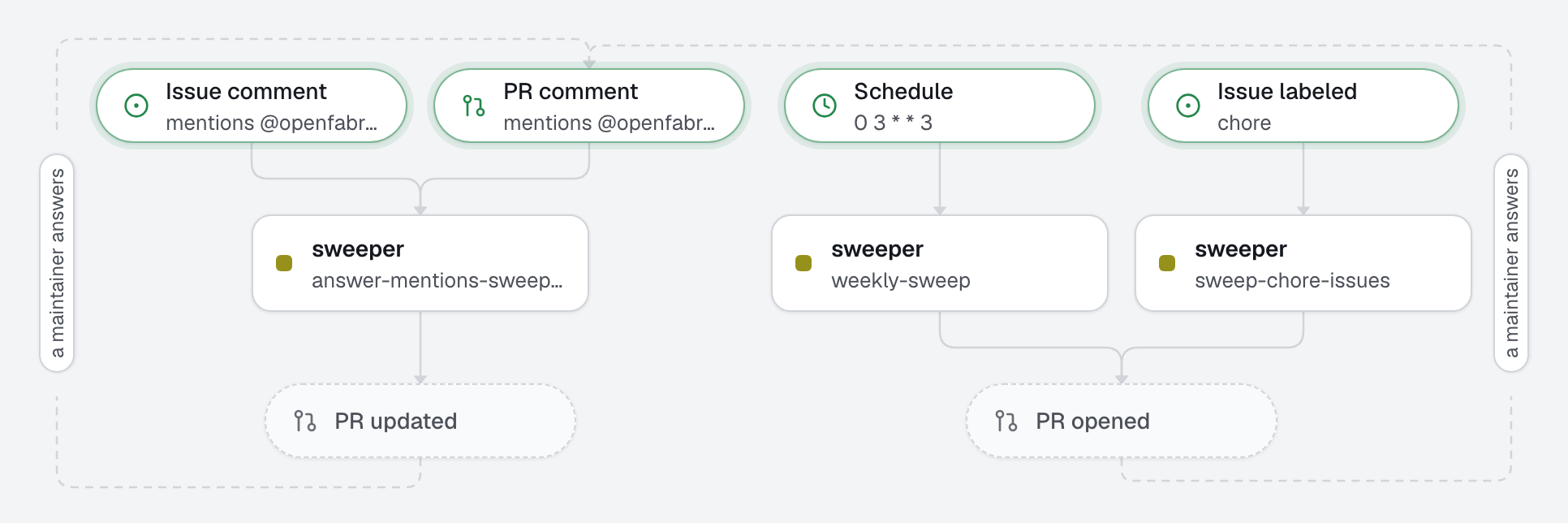
Technical debt rarely gets a sprint; it can get a small pull request a week. An agent removes one piece of debt at a time (a function nothing calls, a TODO three years old, a deprecated call with a documented replacement), proves it changes nothing, and opens a pull request small enough to review in two minutes. It starts on an issue labeled chore, or every Wednesday on its own. The checks must pass before anything leaves the machine, and a human merges.
What this factory does
A strict scope, written down
The agent's brief names the three kinds of cleanup it may make, and a budget: one cleanup per pull request, 150 changed lines and 10 files at most. Over budget, it does fewer occurrences instead of a bigger pull request. It never changes behavior or a public API, never reformats around its change, never edits a test to make it pass. Each pull request shows its proof: the search that finds no use, or the deprecation note that names the replacement.
The checks (test, lint, typecheck) are the harness: the engine runs them before any pull request, and refuses code that fails them.
Tree
openfabriq/
├── factory.yaml                          timezone, setup, commands and checks
├── agents/
│   └── sweeper/agent.md                  one mechanical cleanup, a budget, a list of what it never does
└── automations/
    ├── sweep-chore-issues/               when: issue.labeled chore
    └── weekly-sweep/                     when: schedule "0 3 * * 3"
Two automations, one agent: the same brief, two ways to start it. The weekly one may only open a pull request, since a scheduled run has no issue to comment on.
Make it yours
- Copy the
openfabriq/folder to the root of your repository. - In
factory.yaml, replacerepository,maintainers,timezone,setupand the commands. - In
agents/sweeper/agent.md, adjust the kinds of cleanup, the age of a stale TODO and the budget to your codebase. - Run
openfabriq plan: it lists thechorelabel it will create. Thenopenfabriq applyandopenfabriq start. - Add
choreto an issue, or try the weekly run now:openfabriq run weekly-sweep.
The agent cannot see open pull requests: if last week's is still open, the next run may find the same cleanup. Merge or close it within the week.