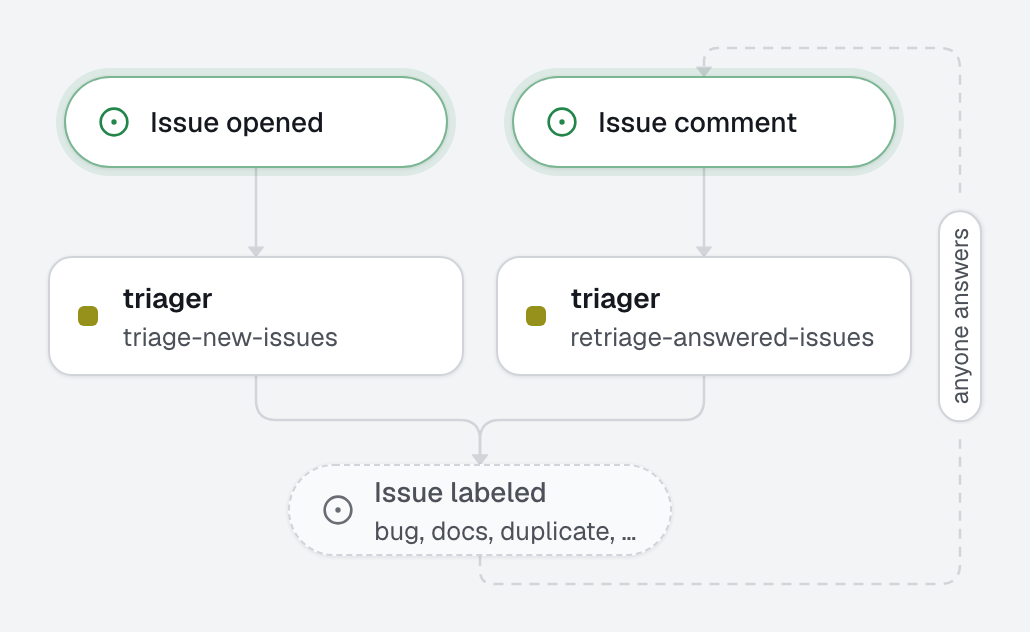
An open project's issue tracker fills faster than maintainers can read it. Here, every new issue is classified (bug, feature, question, docs, duplicate), gets a priority from a fixed list, and a first answer: the likely place in the code for a bug, the answer itself for a question, the original for a duplicate. A report that lacks what is needed to act gets needs-info and precise questions; when the author answers, the issue is triaged again.
What this factory does
Who can start it
Issues on an open project come from anyone, so both automations have from: anyone; openfabriq plan shows it as a security change. What keeps it safe:
- The triager has only
read: noedit, noshell, noweb. - The labels are listed in
can:add_labels: [...]lets the engine add these nine and refuse any other, and only the re-triage may remove a label,needs-info. - It can comment, and close a new issue it calls a duplicate, and nothing else: no pull request, no review.
close_issuecloses only the issue the run is about, so a stranger's issue can at most close itself; a maintainer reopens it in one click. limitsare low: a triage run is short, andusd_per_daycaps what a flood of issues can cost.
The engine's own comments never trigger an automation, so the triager's questions do not start a re-triage.
Notes
- The agent has no GitHub access, so it cannot search other issues. It calls an issue a duplicate only when it can name the original: linked in the issue, or found in
CHANGELOG.mdor the docs. - Type labels are GitHub's defaults except
featureanddocs. Rename them in both automations and in the agent if your repository usesenhancementanddocumentation.
Tree
openfabriq/
├── factory.yaml
├── agents/
│   └── triager/agent.md                    type, priority, first answer; asks when details are missing
└── automations/
    ├── triage-new-issues/                  when: issue.opened, from: anyone
    └── retriage-answered-issues/           when: issue.commented, from: anyone, only acts on needs-info
Make it yours
- Copy the
openfabriq/folder to the root of your repository. - In
factory.yaml, replacerepositoryandmaintainers. - Adjust the priority definitions in the agent to what high, medium and low mean for your project.
- For a private repository where only your team opens issues, remove
from: anyone: onlymaintainersthen start it. - Run
openfabriq plan: it lists the labels it will create andfrom: anyoneas a security change. openfabriq apply, thenopenfabriq start.