Plan and apply
Review the effects of a change, security first, before you apply it.
Three commands take a change from your folder to the running engine.
The three commands
openfabriq validate
openfabriq plan
openfabriq apply| Command | Answers | Changes something |
|---|---|---|
validate | Are the files correct? | No |
plan | What would change, compared with what runs on this machine? | No |
apply | Make this machine run the factory | Yes: the missing labels on GitHub, and the applied factory |
validate
validate checks every file and reports each problem in words, with its file:
✗ factory.yaml: the key "linear" now goes under integrations
✗ automations/implement-linear-issues/automation.md: when linear.issue.labeled or linear.issue.delegated needs linear: { team: <key> } under integrations in factory.yaml
On a valid folder, it says so in one line:

It knows the events, the rights, the tools, the agents your automations name, and the scripts your commands run, and which rights make no sense for a source, such as push_to_pull_request for a Slack run. It changes nothing and needs no network.
plan
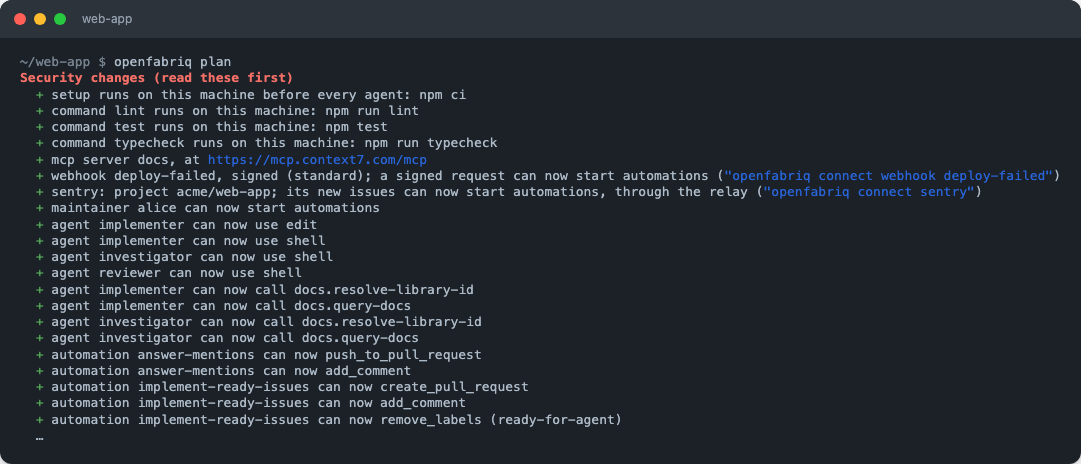
plan compares your openfabriq/ folder with the factory applied on this machine. Security changes come first:
- a maintainer added, or a changed
repository; - an agent that gains any tool but
read; - an automation that gains a right such as
create_pull_request, moves to an agent with more tools, MCP tools or sites, or getsfrom: anyoneorfrom: factory; - a raised limit, a new
setupor command, a check removed; - a script or a skill added, changed or removed; an
envvalue or a secret added, changed or removed; - a new MCP server or tool, a new integration, webhook or Linear delegation;
- the answer to mentions on the factory's pull requests turned on or changed.
Agents, automations and labels to create follow.
An agent or automation moved to another folder, such as into an area, keeps its name and shows on one line: ~ tester: moved to qa/agents/tester.
Run plan on a pull request that changes openfabriq/, to review the effects of the change, not only its text.
apply
apply shows the plan and asks for confirmation (--yes skips it). When factory.yaml names another repository than the checkout's origin, the plan says so, and --yes refuses it unless --project gives the repository. It then creates the missing labels on GitHub, and copies openfabriq/ to ~/.openfabriq/projects/<owner>/<repo>/factory/. That copy is what runs.
apply warns you when you are not on the default branch, or when openfabriq/ has uncommitted changes: apply what is merged.
openfabriq start, run in the repository, does the same before it starts the engine: when the factory changed, it shows the plan and applies it once you confirm.
When the engine picks up a change
A running engine picks up a new or changed factory on its next pass, within a minute, with no restart. Two exceptions are read only when start starts: service connections (openfabriq connect), and a change to Slack, Linear, Sentry or webhooks. Restart it then; apply tells you when.
Change a factory in a conversation
openfabriq initOn a repository that already has openfabriq/, init opens Claude Code in change mode. Describe the change, such as "add a reviewer on opus" or "let the triage run for anyone". Claude Code edits the files, validates them, explains the plan, and saves them on your default branch once you say yes. The next start in the repository applies them, or run apply.
The studio's chat can also check a change you describe, with the same validation and plan, without writing anything.