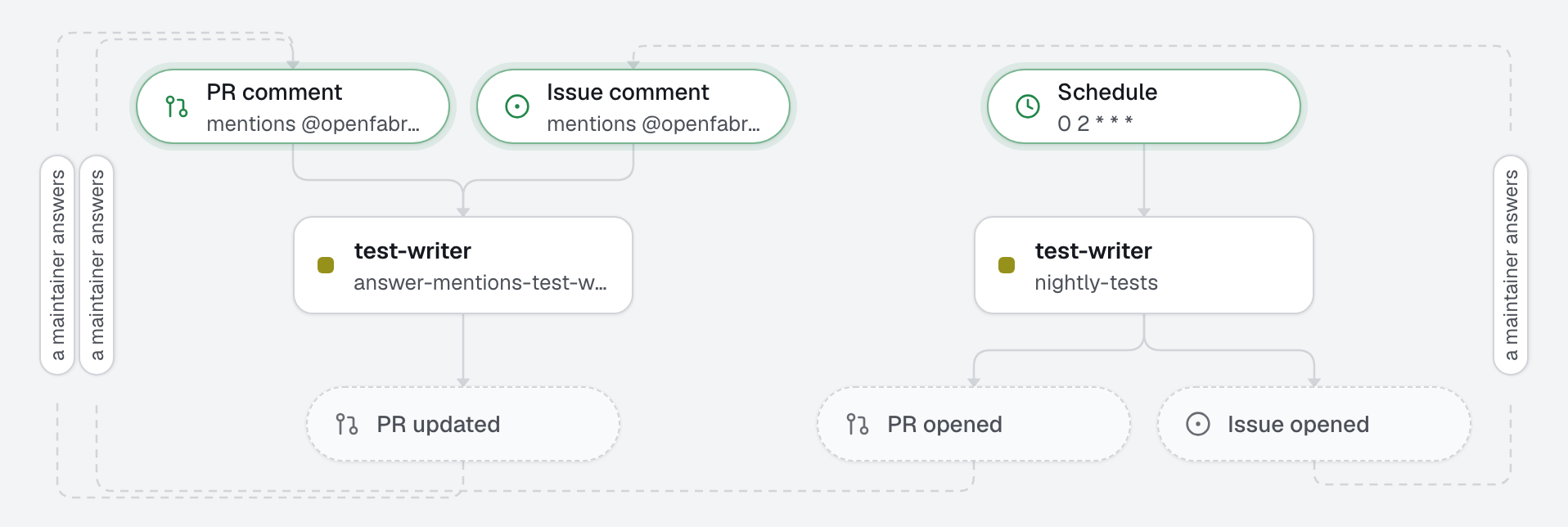
Coverage rises a little every night, on its own. At 02:00 an agent runs the coverage report, picks the module with the fewest tests, and opens a pull request that adds behavioral tests for it: tests that describe what the code does, through its public functions, without changing a line of production code. When a test shows the code is wrong, the agent does not bend the test to pass: it opens an issue with the failing test, and no pull request. A human merges.
What this factory does
Before the pull request leaves the machine, the engine runs the checks (test, lint, typecheck): code that fails them is not published, so a nightly pull request never arrives red.
Tree
openfabriq/
├── factory.yaml                          timezone, setup, commands (coverage among them) and checks
├── agents/
│   └── test-writer/agent.md              tests one module per night, touches no production code
└── automations/
    └── nightly-tests/                    when: schedule "0 2 * * *"
Notes
- The coverage report is read from a file.
run_commandonly returns the end of a command's output, so thecoveragecommand writescoverage/coverage-summary.json(Vitest'sjson-summaryreporter), which the agent reads. Vitest needs its coverage provider for that:pnpm add -D @vitest/coverage-v8. Make yourcoveragecommand write a similar summary, and keepcoverage/in.gitignore. - One pull request at a time. The agent works from the default branch and cannot see open pull requests: if last night's pull request is still open, tonight's run may pick the same module. Merge or close it during the day, or run on weekdays only (
"0 2 * * 1-5"). - A scheduled run has no issue to comment on, so the automation may only open a pull request or an issue. With
02-sdlc, the issue it opens goes to triage like any other. - Nothing runs while the machine sleeps. A missed night is caught up once on waking. To run on time, wake the machine just before:
sudo pmset repeat wakeorpoweron MTWRFSU 01:55:00.
Make it yours
- Copy the
openfabriq/folder to the root of your repository. - In
factory.yaml, replacerepository,maintainers,timezone,setupand the commands, then keep inchecksthe ones that must pass before a pull request. - Run
openfabriq plan, thenopenfabriq applyandopenfabriq start. - To try it without waiting for the night:
openfabriq run nightly-tests.